Barnet HT730 Stock Counter One Sheet
Inventory Using HT730 Stock Counter
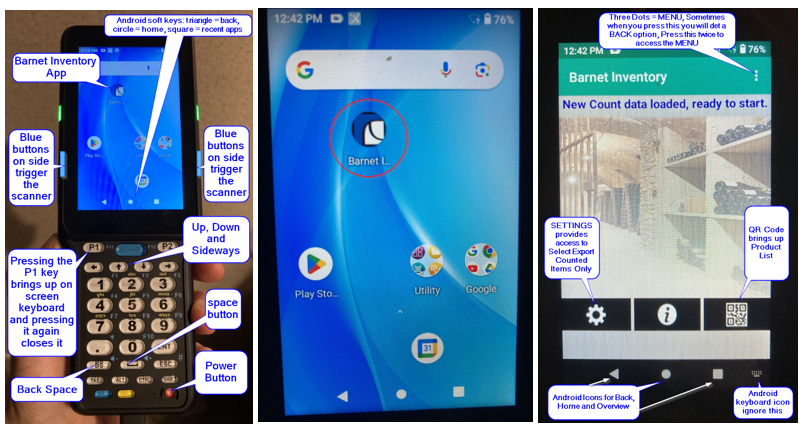
There are 3 steps to counting with the HT730 Stock Counter
Export product list with or without On Hand to Stock Counter from POS Manager
Export product list with or without On Hand to Stock Counter from POS Manager
- On POS Manager, go to: Inventory > Closing Count > Export Product Items to Stock Counter
- On HT730, go to: MENU (3 Dots at top right) > Load Products
Count your products with HT730
Count your products with HT730
- Save Count on MENU when complete
Export your count totals to POS Manager from Stock Counter
Export your count totals to POS Manager from Stock Counter
- POS Manager Inventory > Closing Count > Add Closing Count (or Add Closing Count V. 2) > Apply from Stock Counter
- Set DATE then select the correct filter as needed
- Apply 0 if appropriate
- Post Closing Count

