Restricting Your Delivery Zone
Barnet E-Commerce: Restricting Your Delivery Zone
You can restrict online delivery orders to a specific geographic area by setting up a delivery zone using Google Maps. This ensures customers can only place delivery orders within your approved service area.
Overview
To restrict your delivery area, you will need to:
- Create a delivery zone polygon in your Google account
- Generate a Google Maps API key (small Google usage fees may apply)
- Add the API key and delivery zone to Barnet Network
Once configured, delivery orders will only be accepted from addresses inside your defined zone.
Step 1: Create a Google Delivery Zone (Polygon)
Delivery zones are created using Google Maps tools and saved as a polygon (a drawn boundary on a map).
- Log in to your Google Business / Google Maps account
- Define your delivery area by drawing a polygon around the zone you serve
- Google may charge a minimal usage fee depending on map activity
- Once created, you will use this zone in Barnet Network
Barnet does not create or manage delivery polygons on your behalf. This must be completed in your Google account.
Step 2: Set Up Your Google Maps API Key
A Google Maps API key is required for address validation and delivery-zone checking.
Required Google APIs
When creating your API key, ensure all of the following APIs are enabled:
- Distance Matrix API
- Geocoding API
- Maps JavaScript API
Google’s official guide to creating an API key: https://developers.google.com/maps/documentation/javascript/get-api-key
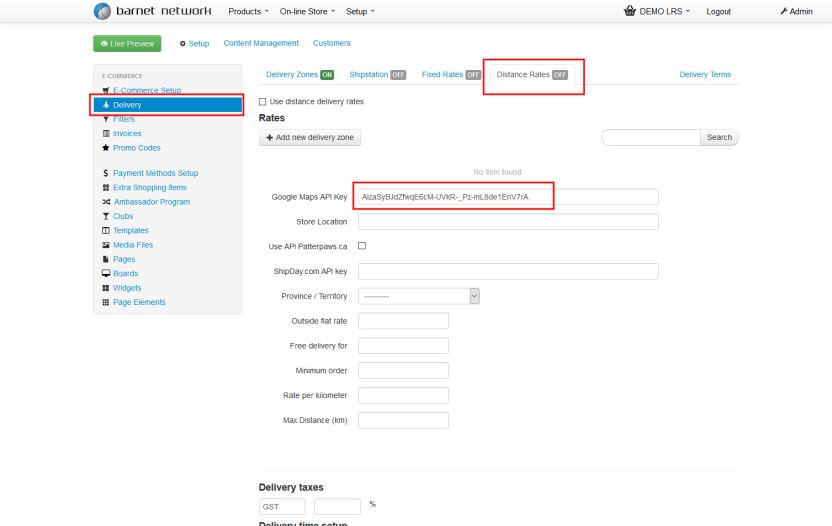
Step 3: Enter the API Key in Barnet Network
Once your API key is created:
- Log in to Barnet Network
- Navigate to E-Commerce / Delivery Settings
- Paste your Google Maps API key into the API field
- Save your changes
This allows Barnet E-Commerce to validate customer delivery addresses.
Step 4: Set Up the Delivery Zone in Barnet Network
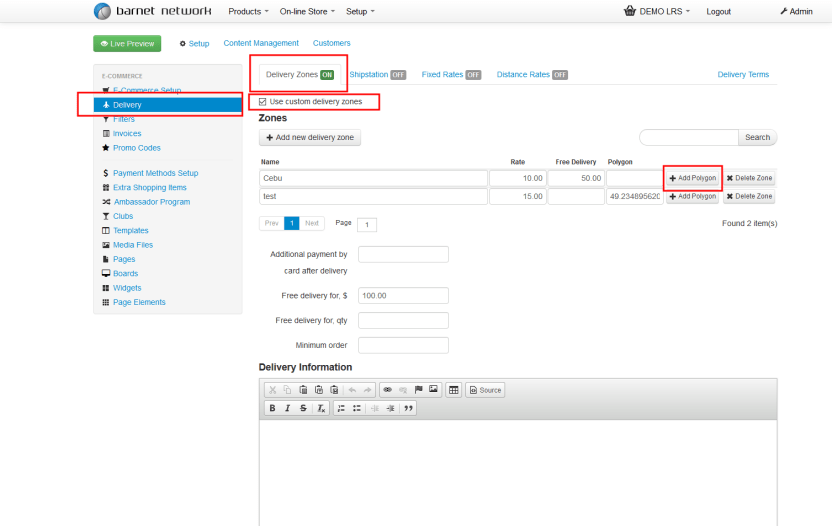
After your API key is added:
- Go to Delivery Zone Settings
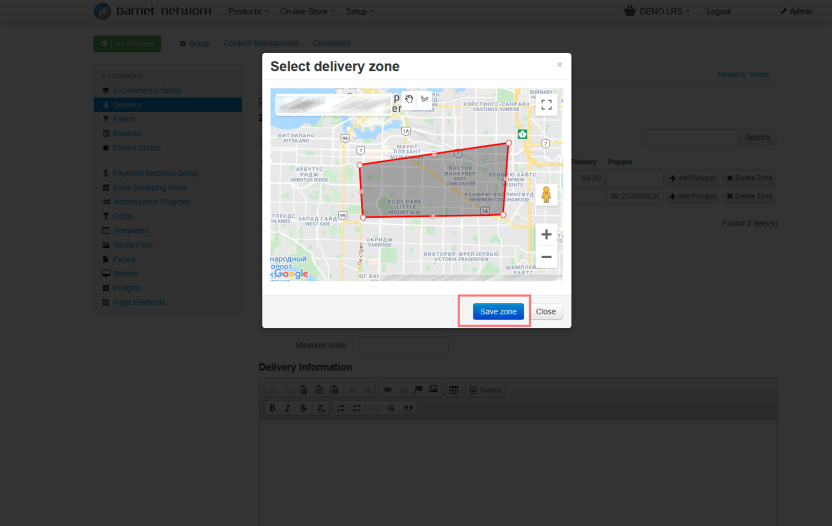
- Select Add Polygon
- Apply the delivery zone created in Google
- Save and confirm the configuration
Important Notes
- Delivery orders will only be accepted within the defined polygon
- Addresses outside the delivery zone will be blocked at checkout
- Google usage fees are billed directly by Google, not Barnet
- Incorrect or missing APIs will prevent delivery validation from working
Best Practices
- Keep delivery zones simple (avoid overly complex shapes)
- Test a few addresses inside and outside the zone before going live
- Review zones periodically if your delivery area changes
- Ensure your API key remains active and billing is enabled in Google

